Firebase and PHP: Integration and Usage
The Firebase integration with PHP I researched for a long time for my own project, written step by step.
Hi everyone. After a lot of searching for my own project, I finally found how to integrate Firebase with PHP in English-language sources. Since there were no Turkish resources at all, I decided to write a simple walkthrough to help fellow developers a bit. Below I'll only show reading data; once you understand the logic, you can use the sample code to figure out the other operations.
NOTE: Use PHP 7.0+ for a smooth integration. Otherwise the kreait package we include won't work.
Including the required files
To connect Firebase and PHP, we need to include functions written by a team of developers in our project. You can get them here: kreait/firebase-php download I'm sharing this one because it covers every Firebase feature, though I only use the database features, so I don't know how the others work. We'll put the files we need into an include folder.
The files we'll use:
the entire vendor folder
composer.json
composer.lock
After copying the files, create db.php and put this inside:
require __DIR__.'/vendor/autoload.php'; use KreaitFirebaseFactory; use KreaitFirebaseServiceAccount; // This assumes that you have placed the Firebase credentials in the same directory // as this PHP file. $serviceAccount = ServiceAccount::fromJsonFile (__DIR__.'/FİREBASE_JSON_DOSYANIZ'); $firebase = (new Factory) ->withServiceAccount($serviceAccount) // The following line is optional if the project id in your credentials file // is identical to the subdomain of your Firebase project. If you need it, // make sure to replace the URL with the URL of your project. ->withDatabaseUri('FİREBASE_LİNKİNİZ') ->create(); $database = $firebase->getDatabase();FİREBASE_LİNKİ (your Firebase URL):
Go to Database > Realtime Database. It's the link right above the JSON data you created; I won't show it with a screenshot.
FİREBASE_JSON_DOSYANIZ (your Firebase JSON file):
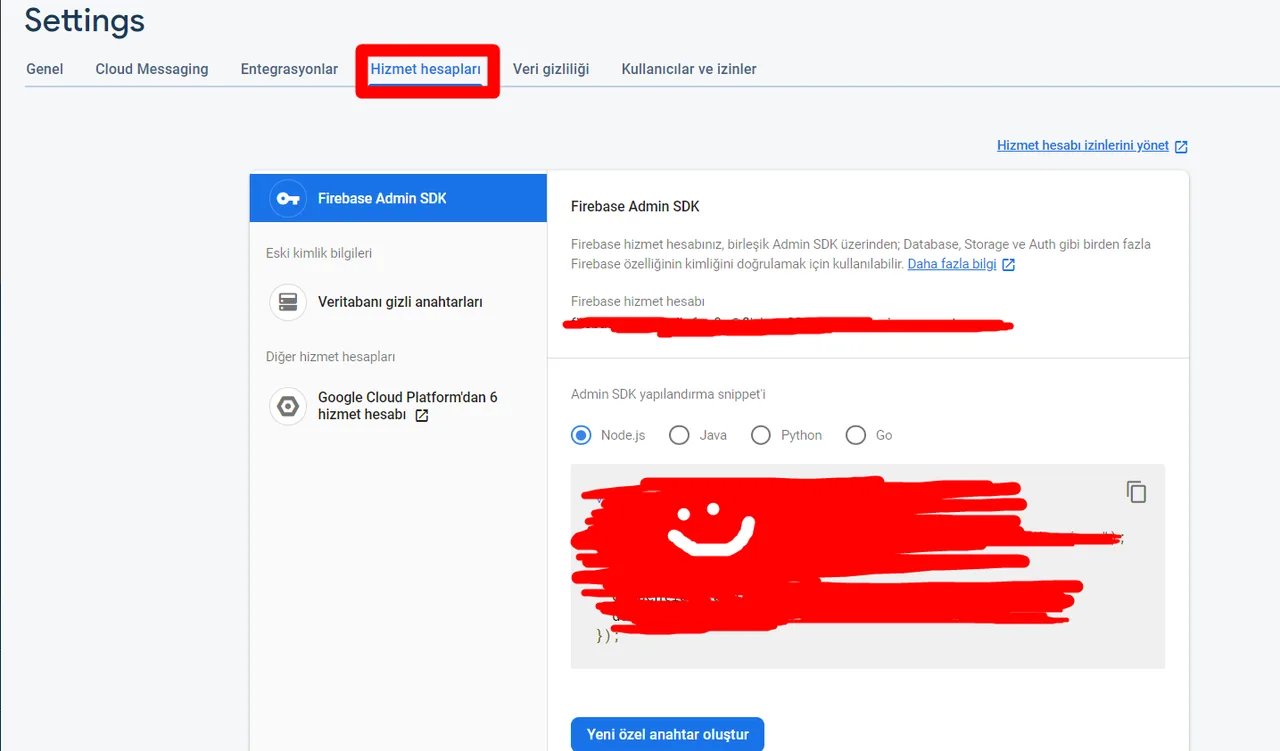
Go to the project settings of your project's database. Click Generate new private key, download the JSON file and put it into the include folder. Then write the file name in db.php.
Reading data
I created index.php as a sample page.
First, include db.php from the include folder at the very top of index.php, like this:
include("includes/db.php");If we haven't made any mistakes so far, we're connected to the database. All that's left is to write a query and read the data, which takes a small piece of code.
$ref = "Kitaplar/"; $most = $database->getReference($ref)->orderByChild('BookView')->limitToLast(13)->getSnapshot()->getValue(); $data = $database->getReference($ref)->getSnapshot()->getValue();I ran two queries above. With $most we take the last 13 by book view count, in other words the 13 most-read books. With $data I fetched all the data under books.
The data is structured as data[indexNo][fieldName].
Reading data with foreach
$mostReverse = array_reverse($most);foreach($mostReverse as $key => $data1){?><a href="watch/<?php echo seo($data1['KTName']). '/' .$data1['KTId']?>"><div class="card-movie"><img src="<?php echo $data1['KTImage'] ?>" data-toggle="tooltip" data-placement="bottom" title="<?php echo $data1['KTName'] ?>" style="width: 100%" height="220" alt="movimg" /></div></a><?php }?>We reverse the variable holding the last 13 books so the list is in a nicer order. We loop over the new $mostReverse variable with foreach and assign each item to $data1. Then, by opening PHP tags between the HTML tags, we print the data with echo $data1["YOUR_FIELD_NAME"].view rawfirebasephpquery hosted with ❤ by GitHub
That's all for reading data. The example I linked below has the same code plus code for adding, deleting and updating data. I'm glad if this helped :)
Comments 0
No comments yet. Be the first.
Leave a comment