How Do I Start Learning to Code?
For the eager, the curious and hobbyists: where to start and what to do.
Hi! In this post I'll explain how to learn programming and what to do, for those who are eager, curious, or want to code as a hobby.
First, we need to decide which platform to choose.
Desktop apps: Desktop is good for applications, automations and building helper code libraries (DLLs). We'll have options such as Windows Forms, advanced forms and console apps.
Mobile: It may not be the best place to start: the errors and code incompatibilities can kill your motivation in no time. If you're just starting out, desktop console and forms apps are a better start, because design on mobile can be harder. If you still want to focus on mobile despite my warning, you can use Unity, Xamarin and Android Studio, the IDEs I know and use.
Web Forms - MVC: Among platforms you can use like ASPX or MVC (there are countless alternatives), I think it's better to move on to web applications after spending time on desktop. You'll be fascinated: when you build your own website you'll be happy to have something real in your hands, you'll get hooked on the web, and you'll start building all kinds of websites and systems. You might ask, "If it's going to fuel our passion, why not start with the web directly?" My answer: unfortunately, errors, errors, errors :) If you start there directly you won't understand much, and if you follow videos you'll end up saying "I did exactly what he did, but mine doesn't work." You need a foundation of knowledge, and you'll get most of it from console and forms apps.
Once you've chosen a platform, it's time to choose a language. Remember: once you understand the structure and logic of one language, learning others is child's play.
C#: Since you're just starting, C# is a great language for building the logic and getting a feel for other languages. Someone who knows C# can pick up languages like C++ and Java right away, because C# descends from both; while learning C# you're effectively learning C++ and Java too, with only small differences in the code.
C++: Considered a very heavy language for beginners. It has endless uses, such as game development, antivirus software and game cheats.
Java: Very similar to C#, with only minor code differences. It's used in many places, such as mobile apps, game development and scripting.
There are thousands of languages; I think explaining three is enough, because the platform I'd suggest for you is Desktop app > C#. Once you get past this phase, you'll start learning the others too :)
Setup for your first app
First we need an IDE to write our code in. I'll show how to install Visual Studio.
Download and run Visual Studio. (Click to download)
Based on your choices, it shows on the right what will be installed.
After installing, it downloads any components missing from your computer.
And we write our first code. I created a forms app, so I printed it in a message box. If you created a console app, replace the code with Console.Write("Hello World"); Console.ReadLine();
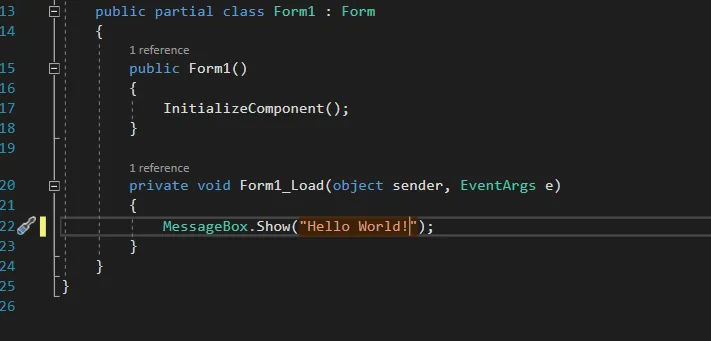
And now we create our first app, Hello World.
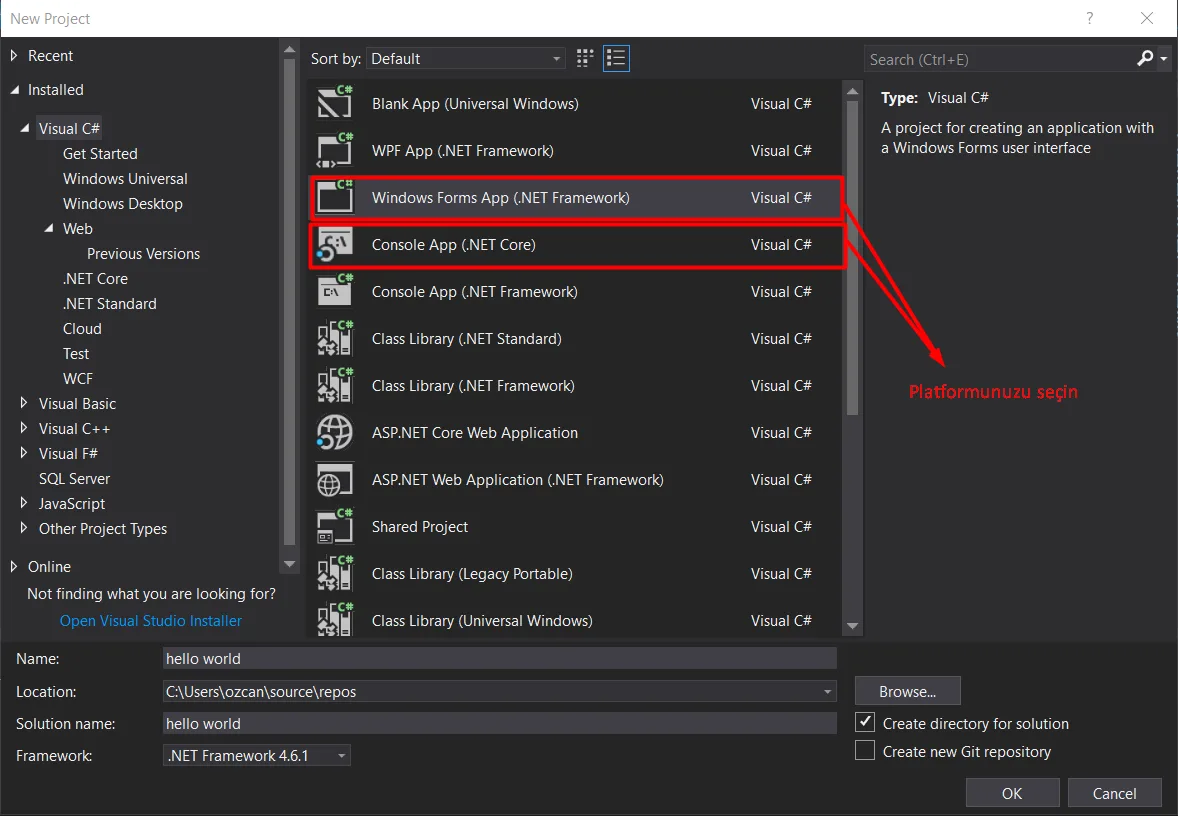
After pressing Create New Project, choose where to save it and give it a name. Be careful not to use Turkish characters.
Open the Visual Studio Installer. You'll see the screen below.
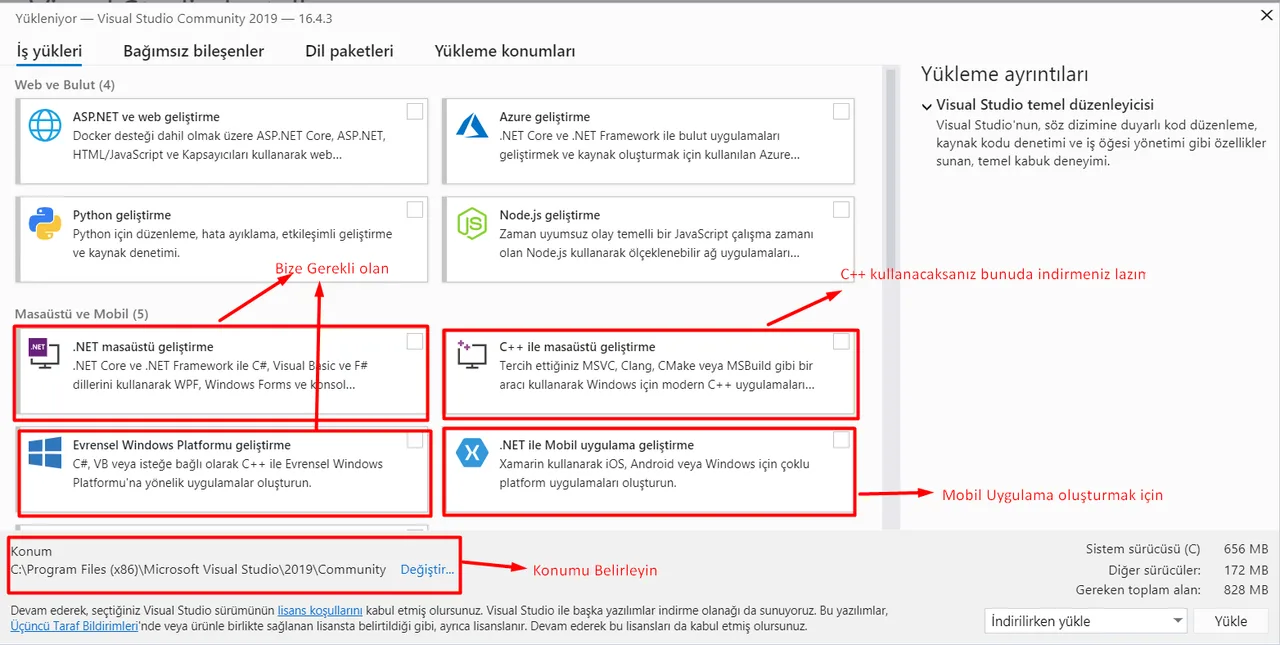
Select the items marked above as you like.
Recommended resources - YouTube (Turkish)
AhmetCan Bozkurt - automation, bots and similar (Go)
Murat Yücedağ - lessons for all platforms (Go)
Desingus - cross-platform design (Go)
Bilgisayar Kavramları - mostly computer science concepts (Go)
Gencay Yıldız - cross-platform lessons (Go)
Sadık Turan - lessons on every language and topic in software (Go)
Recommended Udemy courses (Turkish) - optional
Comments 0
No comments yet. Be the first.
Leave a comment